Friday, January 31, 2014

How to create a fully fledged file download script (.bat)


This time I am going to write about how to create a build (or file) download script (.bat) which you can use for day to day work since I could not found a good post with complete solution. 

Once upon a time, in our project, we had a serious issue regarding the build downloads. Since our teams are geographically dislocated, build is compiled in their location and we need to download the new build daily. 

Altogether, we have 3.5 GB data and it will take around 3.5 hours to download the builds which could not accepted. Due to the pain we had I thought of creating a build download script to download those automatically. Now we just need to install the downloaded builds in the morning.

So following are the exact steps which we need to create the fully fledged script with mail notification.
NB: Main difficulty was that we need to copy a folder that created each day

Step 1:
Create two variables. One for the source and second for the destination.

Ex:
:Variables
SET folderPath=\\182.10.8.56\Builds\BuildComplete <------------------------------------- Source
SET localfolderPath=\\152.30.0.10\Builds\AutoSOBuilds\BuildComplete <--------- Destination

Step 2:
Need to add the following syntax:

FOR /F "delims=|" %%I IN ('DIR "%folderPath%\*.*" /B /O:D') DO SET Newestfolder=%%I

FOR /F - Processing of a command consists of reading the output
'DIR "%folderPath%\*.*" /B /O:D' – This is to take the static folder path and take any folder/file beyond that.
DO SET Newestfolder=%%I – Locate the newest folder/file

Step 3:
Now we need to verify and notify our members that the build/file which we are going to download is already here (I mean we already have the latest build/file). So in this case we need a tool to send emails. So I have used the free version of ‘Smtp Mailer’ (http://www.smtpinfo.com/). This is a very nice tool. So see the syntax:

if exist %localfolderPath%\%Newestfolder%\Web_build (
start /d "D:\" SmtpMail.exe server=smtp.gmail.com from=[gmail address] to=[Send address] user=[gmail address] password=xxxxx ssl license=2013112908f4fc450745794d129cb94c359f0eba subject=You_already_have_the_latest_build body="Your build is already downloaded. Check %localfolderPath%."
exit
)

Step 4:
Let say we do not have the latest build/file. Now we need to add the following syntax:

if exist %folderPath%\%Newestfolder%\Web_build (
start /d "D:\" SmtpMail.exe server=smtp.gmail.com from=[gmail address] to=[Send address] user=[gmail addres] password=xxxxx ssl license=2013112908f4fc450745794d129cb94c359f0eba subject= build_download_is_started body="build download is started - (%Newestfolder%)."

And now we need to copy the build (s) from the newly created folder to our location (\\152.30.0.10\Builds\AutoSOBuilds\BuildComplete).

So we use ‘xcopy’ command:

xcopy "%folderPath%\%Newestfolder%\Web_build" "%localfolderPath%\%Newestfolder%\web_build" /D /E /C /R /I /K /Y
If you want, you can copy many files/folders. See following:
xcopy "%folderPath%\%Newestfolder%\Win_build" "%localfolderPath%\%Newestfolder%\win_build" /D /E /C /R /I /K /Y
exit )

Step 5:
Let say build is failed and no folders are created. Then we need to check that and send an email. See following:

if not exist %folderPath%\%Newestfolder%\Web_build (
start /d "D:\" SmtpMail.exe server=smtp.gmail.com from=[gmail address] to=[Send address] user=[gmail addres] password=xxxxx ssl license=2013112908f4fc450745794d129cb94c359f0eba subject=build_download_is_failed body="build download is failed."
exit
)
else(
exit
)

So all the things are finished. See the full script:

:Variables
SET folderPath=\\182.10.8.56\Builds\BuildComplete
SET localfolderPath=\\152.30.0.10\Builds\AutoSOBuilds\BuildComplete

FOR /F "delims=|" %%I IN ('DIR "%folderPath%\*.*" /B /O:D') DO SET Newestfolder=%%I
if exist %localfolderPath%\%Newestfolder%\[build name] (
start /d "D:\" SmtpMail.exe server=smtp.gmail.com from=[gmail address] to=[Send address] user=[gmail addres] password=xxxxx ssl license=2013112908f4fc450745794d129cb94c359f0eba subject=You_already_have_the_latest_build body="Your build is already downloaded. Check %localfolderPath%."
exit
)
if exist %folderPath%\%Newestfolder%\Web_build (
start /d "D:\" SmtpMail.exe server=smtp.gmail.com from=[gmail address] to=[Send address] user=[gmail addres] password=xxxxx ssl license=2013112908f4fc450745794d129cb94c359f0eba subject= build_download_is_started body="build download is started - (%Newestfolder%)."
xcopy "%folderPath%\%Newestfolder%\Web_build" "%localfolderPath%\%Newestfolder%\web_build" /D /E /C /R /I /K /Y
xcopy "%folderPath%\%Newestfolder%\Win_build" "%localfolderPath%\%Newestfolder%\win_build" /D /E /C /R /I /K /Y
exit
)
if not exist %folderPath%\%Newestfolder%\Web_build (
start /d "D:\" SmtpMail.exe server=smtp.gmail.com from=[gmail address] to=[Send address] user=[gmail addres] password=xxxxx ssl license=2013112908f4fc450745794d129cb94c359f0eba subject=
build_download_is_failed body="build download is failed."
exit
)
else(
exit
)
Hope this will help you to create a working script to download things from different location.

Friday, June 28, 2013

What is performance engineering and why?


In the last decade, performance testing and related stuff are working as the sub functions and maybe they are not that much considered as the main activities in the life cycle of the software product. But due to factors such as increasing of the cyber users, rapid development of the different technologies and modern comparative business goals,  software product venders had to change their mind set towards performance testing and engineering aspects. If they couldn't predict and change their product according to the end user needs and if they couldn't retain the regular users then definitely that business or industry will go down and die out soon.

Then, after the industry identifies the importance of the Performance optimization, performance testing and tuning is came in to the screen with different strategies. First, performance testing methodology was introduced to the product development. In this approach software product is tested by a dedicated performance testing resource and tuned by the help of development team in the later part of the SDLC or after product is 80-90% completed.  So this was a collaborative approach among the team members to get the maximum out of it. But there is a hidden failure in this approach.

As I have mentioned in the last paragraph, all the testing mechanisms, strategies were fired after the major features of the product are almost completed or very next to the alpha or beta releases. But one can argue that if they can find any performance related issues before go live would be a great achievement since the cost of the production site issues were reduced. Yes, true but product owners and developers/QAs cannot concentrate only at the external failures (production issues) thus we have to give the equal attention for the internal failures since both items are contribute to reduce the Cost of Quality of a software product.

Now, all the parties come to the ultimate situation where they need to change their mind set and strategies they have practiced earlier to find the performance bottlenecks. So this is the time that the Performance Engineering attribute or mechanism was introduced and begin to spread the horizon. The main advantage of this engineering practice was the knowledge and the confidence that the team can generate on top of the product which going to release. So lets' find out how the industry gonna build this or how they adapted to this practice.     

Nowadays, agile (scrum) practices are very popular among the software people instead of the waterfall method. Whatever the software development methodology used, practicing of the performance engineering aspects are not that much easy since its required thorough knowledge regarding what and when we need to do things which aligned with the SDLC. For an example good understanding of the current technologies, knowledge of the DB entities, network related awareness, testing tools expertise, knowledge of the performance testing attributes, testing types, capacity planning and workload modeling etc among them. These practices are more sharpen with the different project experience. So in this approach, we start our performance testing engagement from the sprint 0 or requirement analysis phase. In this early phases, performance test engineers can go for the  requirement review and designing meetings with the development team. Likewise performance test team members or specialist can gather, test and examine the results and help to resolve the performance bottlenecks throughout the each sprint or life cycle phase. In other words, performance related issues of the back end and front end  of the Application Under Test (AUT) can be identified as early as possible and not the final stages of the software product.   

Following Graph will depict the core and performance engineering phases:


Finally, by using this methodology or approach, we can find both external and internal performance related issue early to reduce the 'Cost of Quality' and optimize the customer solution to gain the ultimate hope of 'Confidence' to say 'Our Product is OK for go live'.

Thursday, May 30, 2013

About Writing Test Cases


This time I'll share my experience about Test Cases. What are the motivation factors when creating TCs and how we need to write TC in long team projects.  As far as I can see our motivation is to create TCs depend on several aspects and those are as follows:

1. If we are working in a product based company we have to work with one product or related products within a long period of time. Then we are mastering that domain. Hence we try to create TCs with only the essentials and basically those are very similar to the check lists or light test cases. 

2. Process we are following in our companies is another point. If we are following waterfall method then we have lot of time to write lengthy TCs and execute. But in an Agile environment, the approach is bit differ since we have limited time space within a sprint. And also QA members are often tackle with POs, PPOs and Dev members and know all the details in and out so the motivation behind writing lengthy TCs is very low. I think we should follow linear way and do more exploratory testing.

3. Another vital thing would be the TC maintenance. Say if we have several related products and you have thousands of lengthy TCs. If there is a change in the feature etc, again all the related TCs should be updated. But it is not an easy task as you have lengthy and thorough TCs. So you need more main power and money (this is one of the main motivations behind writing linear type TCs in our customer).

4. And one of the most important factors is the project criticality. If the cost of failure in the particular project is very high (Mission critical project) you should have rigorous test cases with all the necessary details. And when there is a requirement change, there should be a very good mechanism to update those test cases though it is expensive. 

But whatever the motivation behind writing TCs I have following suggestions when writing TCs for long term projects. In this approach (filtering mechanism), we have divided our TCs to 3 categories and create separate TCs for each. So the details is as follows:

1. According to the new user story or spec, we can create TCs with all the adequate details. This is the initial TCs we are going to use. So we can say we should write a test case with 100% test coverage. Using these TCs, we can do a thorough feature test after complete the development. Furthermore, this is utmost important when testing critical applications as I said earlier.

2. Then we can write TCs for extended smoke test (So this is more filtered and light version than the first one). So in this case we can do an exploratory testing  as well while executing the TCs to fulfill the major requirement of agile. Furthermore, this category is more related to mind mapping technique (In our company, we have created a model called 'sModel' for this). 

3. And finally, we can create TCs for ready to release test (or light smoke test). So this should be a check list kind of test cases (Very simple). So final result will be test cases with major functionalities. As an example, 'Add / Edit / Delete Contact', 'Document download and read' etc. By using these, we can make sure that the application main functionalities are working as expected within a very short period of time.

Hope this will help you to create TCs for different testing stages.

Wednesday, March 6, 2013

Usability Testing Basics - Part 2


Here are some more information regarding the usability testing and tools behind the process.

In my previous post (Part 1), I have covered 'What is Usability Testing', 'Some Usability Testing Aspects' and 'Usability Testing Categories' which we are normally used when doing a usability test. So finally, I came up with three categories and now I am going to describe those categories bit:

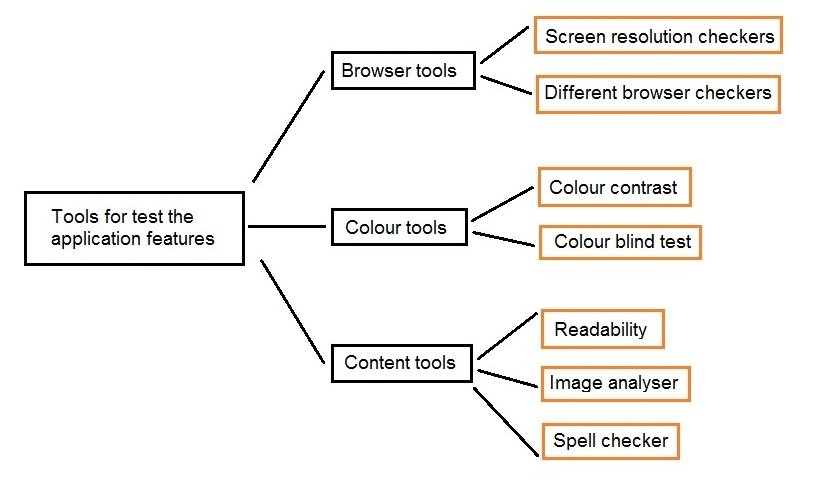
1. Testing based on the results which generated by tools - Colour tools, content tools and browser tools, etc can be used to correct the issues regarding the application features (Mainly UI) which needs to be represent in order to cater all the user groups.


2. Testing based on the anonymous user data which collected by tools - These tools and techniques can be used mainly for sites such as e-commerce web sites, company sites, personal blogs, etc to capture the anonymous user data. These tools collect data from the website visitors and help mainly to understand the user interactions. User clicks, mouse movements, key strokes, form filed information,  geographic locations, different browser types, number of visits, session information, content information are the data which will be collected using these tools. These information are very vital for web applications to fine tune the application in order to give a better service to its customers and visitors.


3. Testing based on the real user participation –  This is another technique which can be used to accomplish different set of usability requirements. This technique can be categorized as moderated and  unmoderated. In moderated testing, the participant can be closely monitored and observed, and can gather vital information regarding participant’s emotional response, user satisfaction etc.
But unmoderated testing technique is used for remote users. They cannot be observed while the test is in progress. Once the usability test is created by the testers, a link is generated and the link (URL) is sent to the participant in a remote location. The participant use this link to access the test and finally get the test data.


Some usability testing tools as follows:


1. ClickTale (http://www.clicktale.com/default.aspx) - 
ClickTale is a tracking usability testing tool which captures user mouse moves, user clicks and scrolls  around a web page.

2. Google analytics (http://www.google.com/analytics/) - 
Google Analytics is an easy to use, free, and very handy usability testing tool that provides a comprehensive set of web site data tracking and analysis tools. 

3. Usabilla  (http://www.usabilla.com/) - 
Usabilla is an unmoderated remote usability testing tool that enables to collect valuable user feedback about the web site by testing new features in an early stage of development.

4. Loop 11 (http://www.loop11.com/) - 
Loop11 is also a remote usability and user experience testing tool, allowing individuals and companies to conduct unmoderated user experience testing on websites.

5. Morae (http://www.techsmith.com/morae.html) - 
Morae is a fully moderated usability testing tool that consist some features such as Record user interactions, efficiently analyze results, and instantly share your findings with anyone, anywhere.


I want to thank Tharinda Liyanage who helped me lot to write this post.


Next post (in Part 3), I’ll explain what is the process we need to have in order to carry out a successful moderated usability testing assignment.